Every webhook integration starts the same way. The provider's documentation shows you a sample payload. You write a handler against it. You deploy. And then the real request arrives and it is not quite the sample: there's an extra wrapper object, the timestamp is a Unix integer rather than ISO 8601, and the signature lives in a header the docs never named.
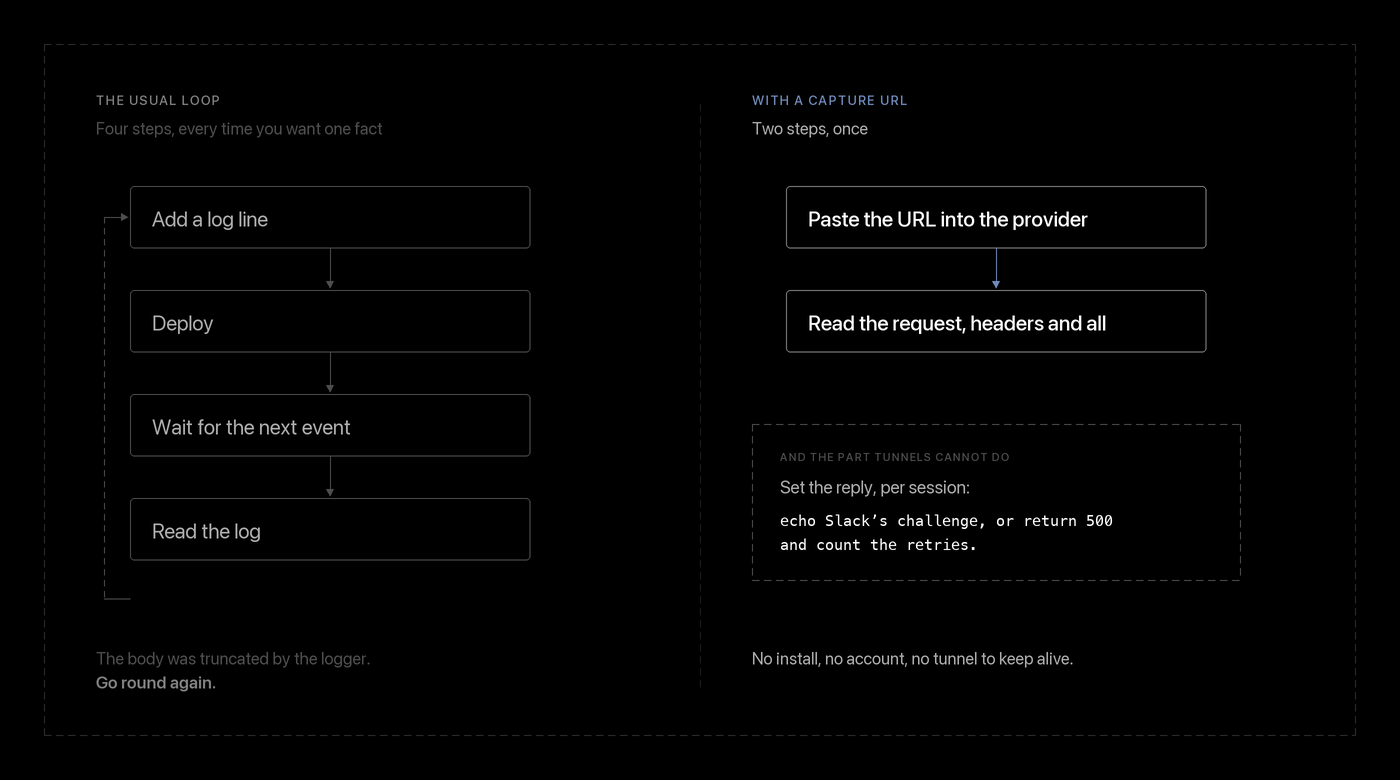
So you add a log line. Deploy again. Wait for the next event. Read the log, discover the body got truncated by your logger, deploy again.
The actual question is small — what exactly is on the wire? — and the loop to answer it is enormous.

The usual ways round it, and why they chafe
A tunnel to localhost (ngrok and friends) is the right tool when you need to step through your own handler in a debugger. It is a lot of ceremony when you only want to look at a payload: install the client, sign in, start the tunnel, paste the rotating URL into the provider's dashboard, and keep a terminal open. And when your laptop sleeps, the URL dies.
A logging endpoint you deploy yourself means you own a deploy cycle for the privilege of calling console.log.
A hosted request bin is the closest fit, which is why there are so many. The common frustrations are that the useful parts sit behind a signup, and that you cannot control what the endpoint replies — which is half the problem.
SnapHook, in about thirty seconds
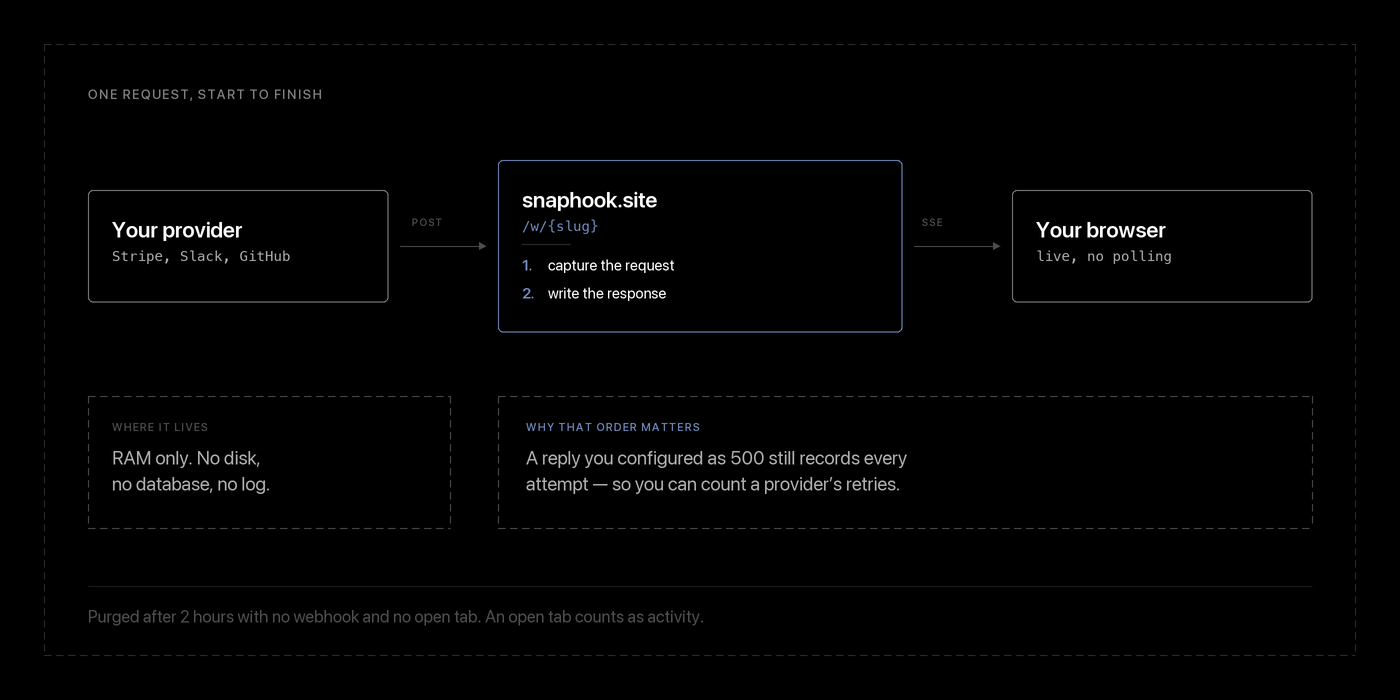
snaphook.site gives you a URL that captures anything sent to it and shows it to you live. No account, no cookies, no analytics, nothing written to disk.
From the browser: press the button, you get a dashboard. From a terminal:
curl -s -X POST https://snaphook.site/api/new{
"expires_at": "2026-10-01T12:30:00Z",
"expires_in_seconds": 7200,
"id": "iszus5e52fbp",
"url": "/app/iszus5e52fbp",
"webhook_url": "https://snaphook.site/w/iszus5e52fbp"
}
Two URLs matter. Give webhook_url to whatever you're debugging. Open https://snaphook.site/app/iszus5e52fbp in a browser to watch.
Then send it something:
curl -X POST https://snaphook.site/w/iszus5e52fbp/orders/created \
  -H 'Content-Type: application/json' \
  -d '{"id":"evt_1","amount":4200}'
It appears in the dashboard immediately. The page holds a Server-Sent Events stream, so there is no polling and nothing to refresh — and nothing to refresh means nothing to miss between refreshes.
Wire-level guarantees:
- Any method, any content type, any sub-path:
/w/{slug}/orders/created,/w/{slug}/v2/hooks?retry=3,PUT,DELETE,PATCH, form-encoded, XML, protobuf — all captured. - Relative paths: The capture reads
/orders/created, not the full proxy prefix. - CORS preflights answered: Answers
OPTIONSwith proper CORS headers so frontend browser fetch calls succeed without errors.
Where it earns its keep: controlling the reply
Capturing the request is the easy half. Plenty of integrations will not proceed until your endpoint says the right thing back.
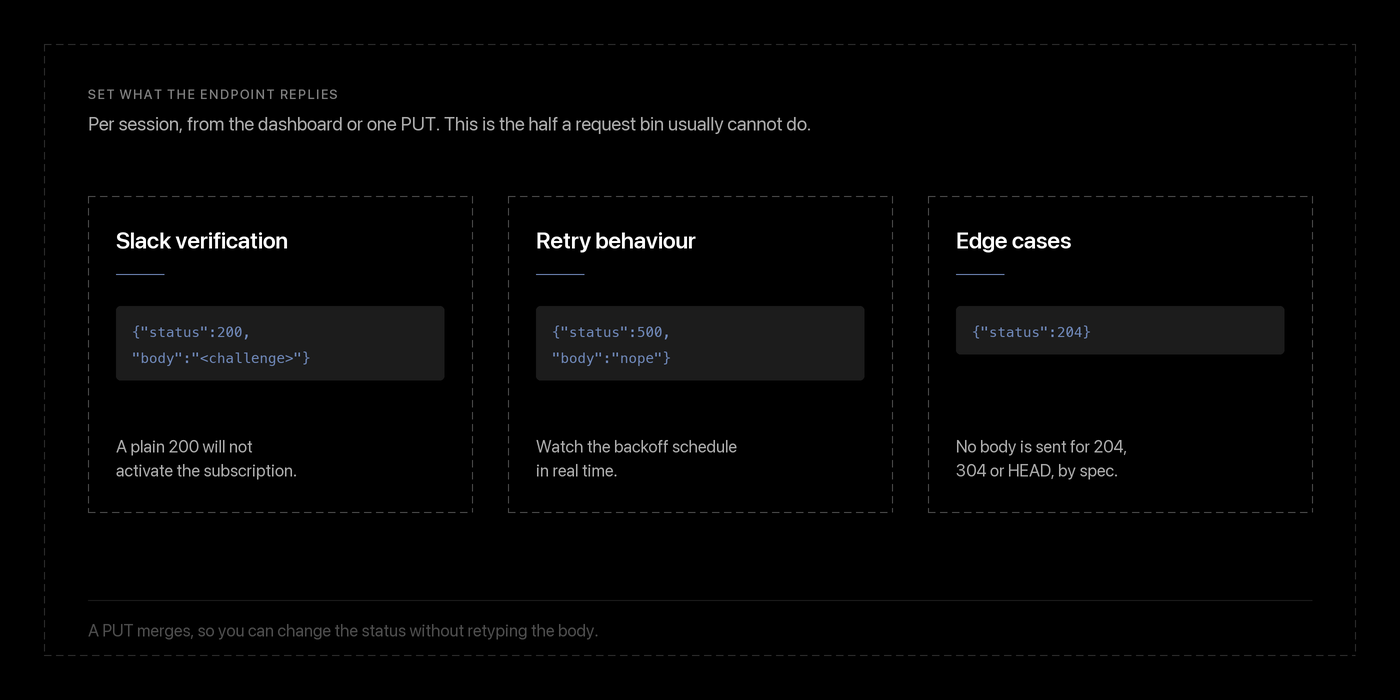
By default SnapHook replies 200 {"ok":true,...}. You can change that per session, from the dashboard's Response dialog or over the API.
Case 1: Slack's URL verification
Slack will not activate an Events API subscription until your endpoint echoes the challenge value it posts. A plain 200 is not enough.
SLUG=iszus5e52fbp

curl -X PUT https://snaphook.site/api/$SLUG/response \
  -H 'Content-Type: application/json' \
  -d '{"status":200,"content_type":"application/json","body":"{\"challenge\":\"3eZbrw1aB...\"}"}'
Paste the challenge from the captured request, save, click Slack's retry. The subscription goes green, and now every real event lands in your dashboard.
Case 2: Provoking a provider's retry logic
You cannot test "what happens when my endpoint is down" against an endpoint that is up. Configure a synthetic failure:
curl -X PUT https://snaphook.site/api/$SLUG/response \
  -H 'Content-Type: application/json' \
  -d '{"status":500,"body":"internal server error"}'
Now watch the provider's backoff schedule in real time: how many attempts, how far apart, whether the payload is byte-identical each time, and whether a retry carries an idempotency key.
The request is captured before the response is written. So a configured 500 still shows you every single attempt. The feature can never cost you the record — which matters, because the whole point of the exercise is observing the retries.
Finding the one delivery you care about
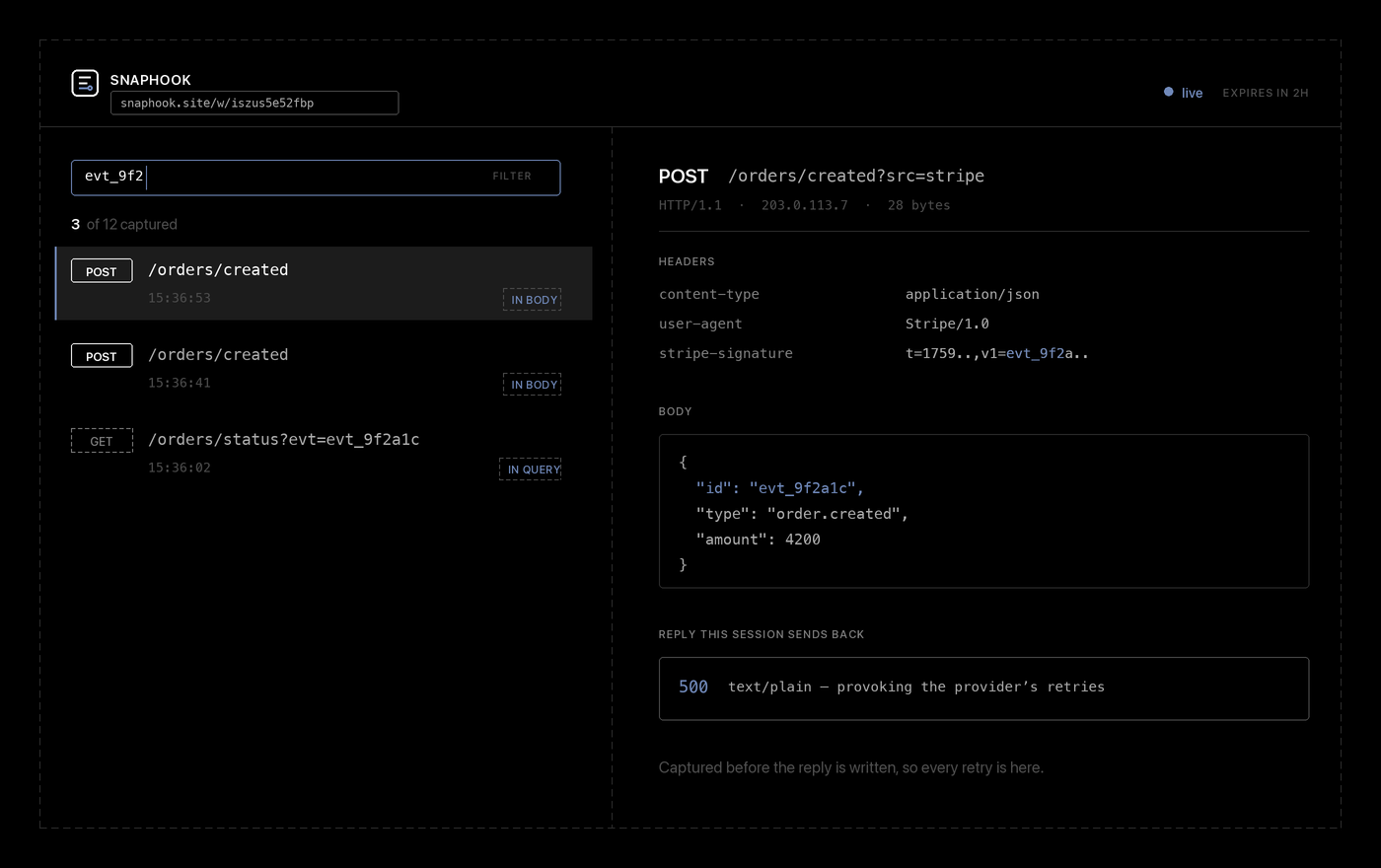
By the time a chatty provider has been pointed at your URL for ten minutes you have thirty captures that look identical in a list.
The filter box (press / to focus it, Escape to clear) searches the whole capture: method, path, remote IP, every header name and value, query parameters, and the body. That matters because the question you actually arrive with is which delivery carried evt_9f2? — and that string is almost never in the visible path. It's in the body, or in a signature header.
Using it from code in CI and Integration Tests
The API is the product as much as the dashboard is. Everything the UI does, a script can do:
#!/usr/bin/env bash
set -euo pipefail

# 1. Mint an ephemeral session
session=$(curl -s -X POST https://snaphook.site/api/new)
slug=$(jq -r .id <<<"$session")
hook=$(jq -r .webhook_url <<<"$session")

# 2. Point system under test at the capture URL
./deploy-to-staging --webhook-url "$hook"
./trigger-order-shipped --order 1234

# 3. Poll for the captured request
for _ in $(seq 20); do
  body=$(curl -s "https://snaphook.site/api/$slug/requests")
  [[ $(jq '.count' <<<"$body") -gt 0 ]] && break
  sleep 1
done

# 4. Assert payload matches expectation
jq -e '.requests[0].body | fromjson | .order_id == 1234' <<<"$body" \
  || { echo "webhook payload wrong:"; jq '.requests[0]' <<<"$body"; exit 1; }

echo "Webhook verification passed!"
Conclusion:
SnapHook answers one question cleanly: what exactly did they send, and what happens if I reply differently? No tunnels to install, no accounts to manage, no disk writes, and zero data retained.